This is my experience for working in existing codebase with Agent3 but I think it would work on new projects as well. I spent some time asking the agent to analyze its workflow after each change and tell me how it could improve. Also asked it to compare the policy to its own system instructions and report findings.
Cost-Effective workflow:
Agent3 has the multi_edit tool that can be used to group actions to single edit but its system instructions are vague, so it does much single edit actions. Also the excessive sub agent delegation seems ineffective, when the agent could do the task itself more precisely.
You should first define a “cost-effective workflow policy” in replit.md and when starting chat, use the plan mode first. Agent won’t read the replit.md automatically, so you have to tell it to read it to get overview and recall the workflow policies.
Remember, every time you start a chat, Agent doesn’t know anything about your codebase, just some boilerplate info that its a React/Python app with database and some other tech info.
I created a small tool script for generating a source file tree out of my project and added that to replit.md. This way when Agent reads the file, it gets the detailed overview and structure of project.
You can get the snippet here (or use some existing npm package):
I noted that a pre-prompt will strengthen the workflow, so I begin every chat with:
(remove space from word “b atch”)
DEV WORKFLOW - 3-5 TOOL CALLS MAX
CORE: Fix root causes, work bottom-up, try the simplest fix, switch layers when stuck, b atch changes, trust dev tools, stop on success.
4-PHASE WORKFLOW:
1. PLAN (0 calls): Map all files/changes. Read error stacks fully - deepest frame = real issue.
2. DISCOVER (1-2 calls): B atch ALL reads (3-6 files). Never read→analyze→read.
3. EXECUTE (1-3 calls): Use multi_edit for multiple changes per file. B atch parallel edits. Fix patterns not instances.
4. VALIDATE (0-1 calls): Stop when HMR/console/LSP confirms success. No screenshots.
RULES: Max 6 tools per b atch. Read multiple files simultaneously. No sub_agent calls. No task lists. No architect, unless requested.
Find and read the full `replit.md` first.
---
<your prompt>
Agent will plan with more effective approach analyzing, planning and discovering changes needed. When the agent has come up with a plan, switch to build mode and Agent will execute the plan with grouped edits in parallel for more cost effective results and reducing costly actions and unnecessary steps.
This seems to work as long as agent does the work itself, if a task gets delegated to sub agent, it will forget your instructions and follow default steps of ineffective small incremental changes, calling architect (Opus 4) and do long success verifications.
Here’s my “workflow policy” for base reference:
(Note: the word b atch has space in it, remove it. Forum prevents the word in posts)
# Development Workflow Policies & Guidelines

**Version:** 2.0
**Target:** 3-5 total tool calls for most modification requests

## Core Philosophy

The following principles guide all development work:

- **Find the source, not the symptom**
- **Fix the pattern, not just the instance**
- **b atch all related changes**
- **Trust development tools**
- **Stop when success is confirmed**
- **Trace to source, not symptoms** - Find the actual originating file/function, not just where errors surface

## File Prediction & Surgical Reading ⚠️ CRITICAL

### Core Principle
Always predict BOTH analysis files AND edit targets before starting.

### Mandatory Workflow
1. **Map problem** → affected system components → specific files
2. **Predict which files** you'll need to READ (analysis) AND EDIT (changes)
3. **b atch ALL predicted files** in initial information gathering
4. **Execute all changes** in single multi_edit operation

### File Prediction Rules
- **For UI issues:** Read component + parent + related hooks/state
- **For API issues:** Read routes + services + storage + schema
- **For data issues:** Read schema + storage + related API endpoints
- **For feature additions:** Read similar existing implementations

### Cost Optimization
- **Target:** 2 tool calls maximum: 1 read b atch + 1 edit b atch
- **Anti-pattern:** read → analyze → search → read more → edit
- **Optimal pattern:** read everything predicted → edit everything needed

### Success Metric
Zero search_codebase calls when project structure is known.

## Super-b atching Workflow ⚠️ CRITICAL

**Target:** 3-5 tool calls maximum for any feature implementation

### Phase 1: Planning Before Acting (MANDATORY - 0 tool calls)
- Map ALL information needed (files to read, searches to do) before starting
- Map ALL changes to make (edits, database updates, new files)
- Identify dependencies between operations
- Target minimum possible tool calls
- Read error stack traces completely - The deepest stack frame often contains the real issue
- Search for error patterns first before assuming location (e.g., "localStorage" across codebase)

### Phase 2: Information Gathering & Discovery (MAX PARALLELIZATION - 1-2 tool calls)
- b atch ALL independent reads/searches in one function_calls block
- **NEVER do:** read(file1) → analyze → read(file2) → analyze
- **ALWAYS do:** read(file1) + read(file2) + read(file3) + search_codebase() + grep()
- Only make sequential calls if later reads depend on analysis of earlier reads
- Use `search_codebase` ONLY if truly don't know where relevant code lives
- Otherwise, directly `read` target files in parallel (b atch 3-6 files at once)
- Skip exploratory reading - be surgical about what you need

### Phase 3: Implementation & Pattern-Based Execution (AGGRESSIVE MULTI-EDITING - 1-3 tool calls)
- Use multi_edit for ANY file needing multiple changes
- **NEVER** do multiple separate edit() calls to same file
- b atch independent file changes in parallel
- **Example:** multi_edit(schema.ts) + multi_edit(routes.ts) + multi_edit(storage.ts)
- Plan all related changes upfront - Don't fix incrementally
- Identify change scope before starting - localStorage issue = all localStorage calls need fixing
- Apply patterns consistently - If one component needs safeLocalStorage, likely others do too
- Group by file impact - All changes to same file in one `multi_edit`
- Fix root causes, not band-aids - One proper fix beats multiple symptom patches

### Phase 4: Operations & Selective Validation (SMART BUNDLING - 0-1 tool calls)
- Bundle logically connected operations
- **Example:** bash("npm run db:push") + refresh_logs() + get_diagnostics() + restart_workflow()
- **NEVER** do sequential operations when they can be b atched
- Skip validation for simple/obvious changes (< 5 lines, defensive patterns, imports)
- Only use expensive validation tools for substantial changes
- Stop immediately when development tools confirm success
- One `restart_workflow` only if runtime actually fails

### Cost Targets
- **Feature implementation:** 3-5 tool calls maximum
- **Bug fixes:** 2-3 tool calls maximum
- **Information gathering:** 1 tool call (parallel everything)
- **File modifications:** 1-2 tool calls (multi_edit everything)

### Decision Framework
Ask yourself:
- What else can I b atch with this?
- Do I have ALL the information I need before making changes?
- Can I combine this edit with others using multi_edit?
- What's the dependency chain - can I collapse it?

**Success Metric:** Target 30-50% cost reduction compared to sequential approach.

## Tool Selection Matrix

### High-Value Low-Cost (use liberally)
- `read` (b atch 3-6 files)
- `edit`/`multi_edit`
- `grep` with specific patterns

### Medium-Cost (use judiciously)
- `search_codebase` (only when truly lost)
- `get_latest_lsp_diagnostics` (complex changes only)

### High-Cost (use sparingly)
- `architect` (major issues only)
- `screenshot` (substantial changes only)
- `restart_workflow` (actual failures only)

## Mandatory Workflow Adherence

- **MAXIMUM 5 tool calls** for any change request
- No exploration - be surgical about file reading
- No incremental changes - make all related edits in one b atch
- No workflow restarts unless runtime actually fails (not just for verification)
- Maximum 6 tools per b atch to prevent overwhelming output

## Parallel Execution Rules

- Read multiple files simultaneously when investigating related issues
- Apply edits in parallel when files are independent
- Never serialize independent operations - b atch aggressively
- Maximum 6 tools per b atch to prevent overwhelming output

## Defensive Coding Patterns

- Wrap external API calls in try-catch from the start
- Use null-safe operations for optional properties
- Apply security patterns consistently across similar code

## Verification Rules

### Verification Anxiety Prevention
- **Stop checking once the development environment confirms success**
- Resist urge to "double-check" working changes
- Trust professional development tools over manual verification
- Remember: More verification ≠ better quality, just higher cost

### Stop Immediately When
- HMR shows successful reload
- Console logs show expected behavior
- LSP errors cleared for simple syntax fixes
- Development server responds correctly

### Never Verify When
- Change is < 5 lines of obvious code
- Only added try-catch wrappers or similar defensive patterns
- Just moved/renamed variables or functions
- Only updated imports or type annotations

## Strategic Sub-agent Delegation Guidelines ⚠️ CRITICAL

**Target:** Minimize overhead while maximizing execution efficiency

### Core Principle
Sub-agents are expensive tools that should be used very selectively.

### Cost Reality

**Overhead factors:**
- Context transfer overhead: 1-2 extra tool calls for problem explanation and handoff
- Cold-start reasoning: Each sub-agent rediscovers what primary agent already knows
- Tool multiplication: Two agents often double the read/edit/validate calls
- Coordination complexity: Merging outputs and reconciliation reviews

**Optimal approach:** Single agent with parallel tools can b atch discovery + edits in 3-5 calls.

### Effective Delegation Scenarios

#### Independent Deliverables
- **Description:** Independent text deliverables
- **Examples:** Documentation, test plans, release notes, README files
- **Rationale:** Output doesn't require tight coordination with ongoing code changes

#### Specialized Audits
- **Description:** Specialized expertise audits
- **Examples:** Security reviews, performance analysis, accessibility passes
- **Rationale:** Requires deep specialized knowledge separate from main implementation

#### Research Tasks
- **Description:** Large, loosely coupled research tasks
- **Examples:** Background research while primary agent codes, API exploration
- **Rationale:** Can run in parallel without blocking main development flow

### Avoid Delegation For (MANDATORY)

**Anti-patterns:**
- Code fixes and refactors (our bread and butter)
- Pattern-based changes across files
- Schema/route/UI modifications
- React UI tweaks, route additions, API handler adjustments
- Anything well-served by grep+b atch+HMR approach

**Rationale:** These require tight coordination and unified execution patterns.

### Decision Framework

1. **Is this an independent deliverable that doesn't affect ongoing code?**
   - If yes: Consider delegation
   - If no: Continue to next question

2. **Does this require specialized expertise separate from main task?**
   - If yes: Consider delegation
   - If no: Execute with single agent + parallel tools

### Single-Agent Focus

For 80-90% of development tasks, use proven single-agent patterns:
- **4-tool pattern:** discovery → b atch execution → trust HMR
- Parallel tool usage for maximum efficiency
- Pattern-based fixes requiring tight coordination
- **Efficiency target:** 3-5 tool calls maximum for most modification requests

### Success Criteria
- Sub-agent usage limited to truly independent or specialized tasks
- No sub-agent delegation for standard CRUD, UI, or API tasks
- Maintain 3-5 call efficiency target for main development workflows

## Expert Architect Sub-Agent Usage Policy ⚠️ CRITICAL

**Cost Model:** Expensive Opus 4

### ⚠️ WARNING
CRITICAL: Architect uses expensive Opus 4 model - use SPARINGLY

### Self-Review First Principle

Before calling architect, I must first attempt to:
1. Self-assess code quality from architectural perspective
2. Review my changes for obvious issues, patterns, maintainability
3. Think through edge cases and potential improvements myself
4. Consider user requirements and ensure solution aligns with goals

### Usage Hierarchy (Ascending Expense)

#### Never Use For
- Simple code fixes (< 10 lines)
- Obvious syntax errors or imports
- Adding defensive patterns (try-catch, null checks)
- Straightforward feature additions
- When development tools (HMR, logs) confirm success

#### Only Use When I Genuinely Cannot
- **Debug complex issues** - When truly stuck after multiple approaches
- **Design system architecture** - For major structural decisions beyond my reasoning
- **Review substantial changes** - When changes >50 lines or affect core architecture
- **Evaluate trade-offs** - When multiple valid approaches exist and I need expert analysis

### Mandatory Self-Reflection

Ask myself these questions:
- "Have I thoroughly understood the problem scope?"
- "Can I identify the architectural concerns myself?"
- "Are there obvious code quality issues I can spot?"
- "Does this change align with project patterns and goals?"
- "Am I calling architect due to laziness or genuine complexity?"

**Goal:** The goal is to develop my own architectural thinking, not outsource it.

## Workflow Examples

### Successful Example: localStorage Fix (4 tool calls)
1. **Discovery:** Read replit.md + search codebase + read target file (parallel)
2. **Execution:** Applied safeLocalStorage wrapper to all localStorage calls (multi_edit)
3. **Result:** Fixed SecurityError in sandboxed environments
4. **No over-verification:** Trusted HMR reload confirmation

### Inefficient Example: Previous Approach (11 tool calls)
**Problems:**
- Multiple exploratory reads
- Incremental fixes
- Excessive verification (screenshots, log checks, restarts)
- Verification anxiety leading to over-checking
Update 15.9:
More simplified “workflow policy” for replit.md
Source file tree generation for replit.md
Pre-prompt when starting new agent chat.
Edit 19.9:
Restored original policy
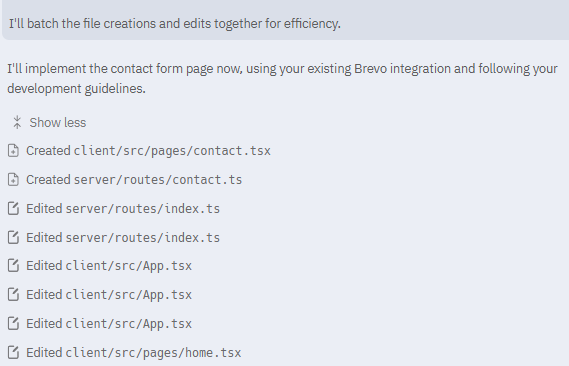
Here are few screenshots of latest feature additions for my app, Agent did it in two steps: plan, execute. Maybe its luck, but I didnt have to fix anything after, changes worked. At least it does give some benefit.
Contact form addition and integration with Brevo:
Planning:

Batching actions:
Completion:

Another one, adding an AI builder to survey form, generating surveys with existing schema:
Planning:


Completion:
