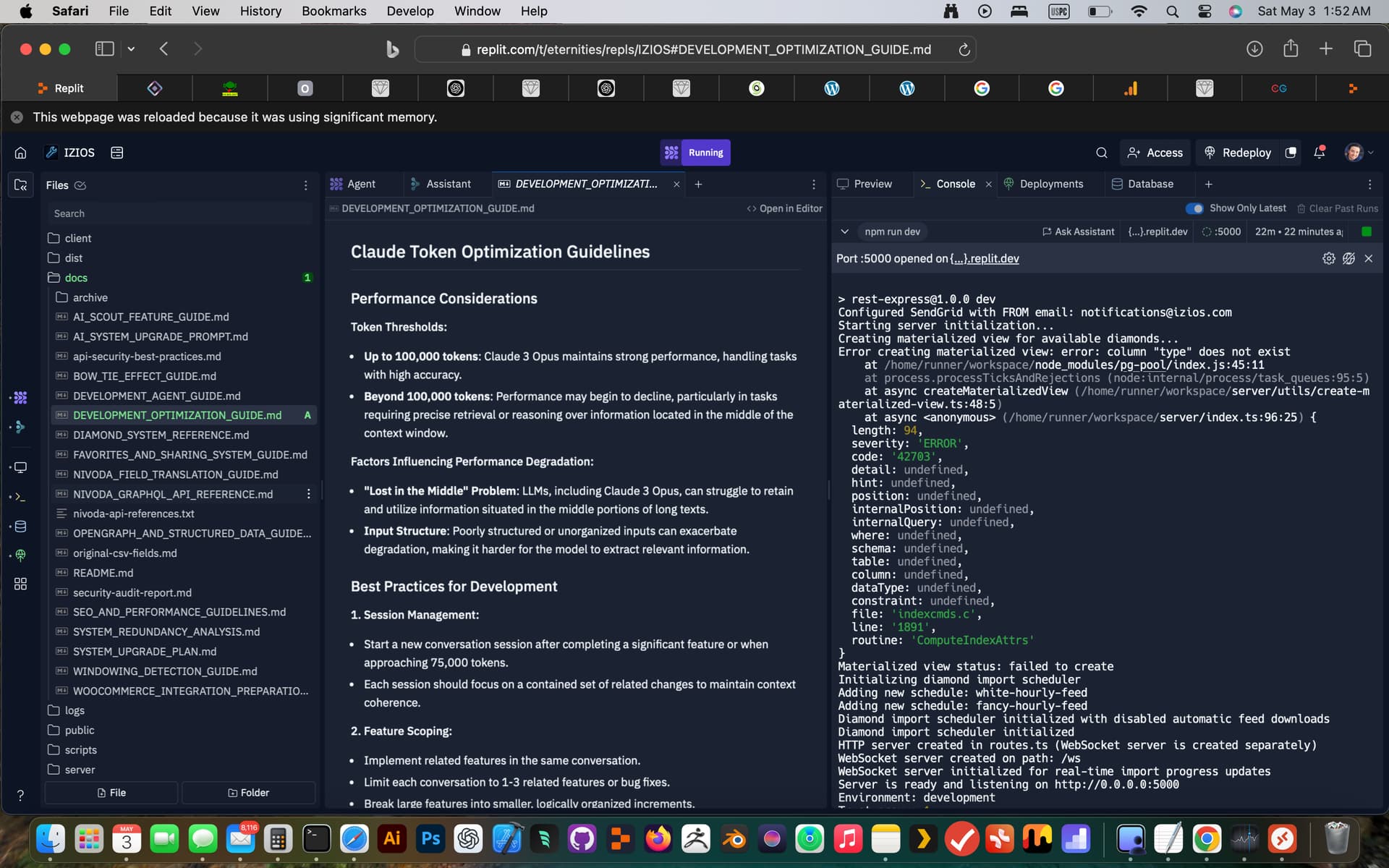
I wanted to share the guides and prompts I am using to get stuff done with my system. I included some of the guides and a prompt, I also have a development optimization guide to work within the limitations of claude 3 which helps optimize he coding to fit within the context windows it allows, see screenshot, it would not fit in the post.
Here is the condensed plaintext version of your IZIOS Development Agent Guide:
IZIOS Development Agent Guide
Version: 1.0.0
Last Updated: May 3, 2025
Development Company: Hypler (hypler.com)
Lead Developer: Jeffrey Jones
AI Development Support: Replit Agent (Claude 3 Opus)
Overview
This guide defines rules for AI and human developers contributing to the IZIOS diamond platform. It emphasizes documentation-driven development, consistent patterns, version control, and clean integration.
Core Development Principles
1. Documentation-First Development
- Always start with current documentation:
DIAMOND_SYSTEM_REFERENCE.mdoriginal-csv-fields.md- Never use
/archivedocs directly
- Ensure features align with system interfaces
- Confirm no data model or feature conflicts
2. Documentation Update Workflow
- Minor Updates: Edit docs, add code examples, increment MINOR version
- Major Features: New doc files, update system index, increment MAJOR version
- Deprecations: Move docs to
/archive, create migration guides
3. Versioning System
Use semantic versioning:
- MAJOR.MINOR.PATCH
- Main
README.mdmaintains history
Feature Development Workflow
Pre-Development
- Analyze documentation
- Specify UI, API, DB requirements
- Plan documentation updates
Implementation
- Follow existing architecture and naming conventions
- Implement in order: DB → services → UI
- Use feature flags for major changes
Post-Development
- Document technical and user-facing updates
- Update version numbers and changelogs
- Archive deprecated features
IZIOS-Specific Rules
Data Management
- camelCase naming across DB, API, and frontend
- Use transactions for critical DB operations
- Follow field names from original CSV reference
Integration
- Include SEO and OpenGraph metadata
- Features must be discoverable and accessible
- Integrate with favorites and sharing system
Platform Constraints
- Mobile responsiveness required
- Follow SEO/performance guidelines
- Label experimental analysis features as BETA
Authentication and Change Management
Attribution Format
Developed by Hypler (hypler.com)
Lead Developer: Jeffrey Jones
AI Assistance: Replit Agent (Claude 3 Opus)
Date: YYYY-MM-DD
Version: X.Y.Z
Change Log Requirements
- Reference tickets and migration steps
- Document tests and approvals
- Lead dev review required
Common Pitfalls
Architecture
- Don’t bypass service layer
- Maintain separation of concerns
- Reuse existing UI components
Documentation
- Don’t leave examples or references outdated
- Include practical usage examples
Performance
- Optimize queries and limit payloads
- Use DB indices and resource management
Standards Enforcement
Before Implementation
- Verify doc alignment, UI consistency, and DB planning
During Implementation
- Follow TDD, validate inputs, handle errors, secure code
After Implementation
- Update docs, archive outdated content, version control
Cost-Saving Practices
- Reuse existing components
- Build MVPs, iterate with feedback
- Automate tests and use coverage metrics
Version History
| Version | Date | Changes | Approved By |
|---|---|---|---|
| 1.0.0 | 2025-05-03 | Initial guide | Jeffrey Jones |
Key References
Primary System Docs
DIAMOND_SYSTEM_REFERENCE.mdoriginal-csv-fields.mdNIVODA_GRAPHQL_API_REFERENCE.mdNIVODA_FIELD_TRANSLATION_GUIDE.md
Feature-Specific
SEO_AND_PERFORMANCE_GUIDELINES.mdOPENGRAPH_AND_STRUCTURED_DATA_GUIDE.mdAI_SCOUT_FEATURE_GUIDE.mdFAVORITES_AND_SHARING_SYSTEM_GUIDE.mdBOW_TIE_EFFECT_GUIDE.mdWINDOWING_DETECTION_GUIDE.md
Integrations
SYSTEM_UPGRADE_PLAN.mdWOOCOMMERCE_INTEGRATION_PREPARATION.md
By adhering to this guide, developers help maintain quality, integrity, and alignment across the entire IZIOS platform.
IZIOS System Upgrade AI Prompt
Context
You are tasked with upgrading the IZIOS diamond management platform according to our System Upgrade Plan. You are an AI assistant working with the Hypler development team (hypler.com) led by Jeffrey Jones. Your primary role is to implement upgrades with minimal disruption while ensuring all new features integrate seamlessly with existing functionality.
Rules of Engagement
- Documentation-First Approach
- ALWAYS consult the
/docs/DEVELOPMENT_AGENT_GUIDE.mdbefore making any changes - Reference only current documentation (not archived) for implementation details
- Follow versioning and attribution practices exactly as documented
- Data Integrity
- Never use mock data or placeholders in production code
- Always verify data models against
/docs/original-csv-fields.md - Maintain camelCase standardization across all new database fields
- Never perform destructive database operations without explicit confirmation
- Code Modification Safety
- Develop iteratively with small, testable changes
- Always implement proper error handling
- Create automated tests for critical functionality
- Preserve existing patterns and architectures
- Integration Requirements
- Ensure all new features work with the favorites system
- Maintain SEO best practices from
/docs/SEO_AND_PERFORMANCE_GUIDELINES.md - Implement proper OpenGraph and structured data as specified
- Keep existing API contracts intact unless explicitly changing
System Upgrade Tasks
Implement the following improvements in priority order:
1. Diamond Import System Optimization
Refer to: /docs/SYSTEM_UPGRADE_PLAN.md sections 2.1-2.4
- Refactor the CSV importer to use camelCase field mapping exclusively
- Optimize the FTP import with intelligent file caching
- Implement the Nivoda API enhancements for real-time synchronization
- Add improved logging without blocking the UI thread
- Ensure all imports standardize data formats consistently
Key constraints:
- Maintain backward compatibility with existing data
- Do not delete or modify existing records unless explicitly requested
- Use database transactions for all data modifications
- Implement proper error recovery mechanisms
2. Diamond Analysis Feature Enhancements
Refer to: /docs/BOW_TIE_EFFECT_GUIDE.md and /docs/WINDOWING_DETECTION_GUIDE.md
- Enhance bow tie effect detection with improved visualization
- Optimize windowing detection algorithm for better accuracy
- Integrate these features into the main diamond search interface
- Ensure proper labeling of BETA features
Key constraints:
- Use existing algorithm patterns as documented
- Maintain scientific accuracy in all calculations
- Ensure UI components follow established design patterns
- Include educational content for users to understand these features
3. SEO and Social Optimization
Refer to: /docs/OPENGRAPH_AND_STRUCTURED_DATA_GUIDE.md
- Implement dynamic OpenGraph image generation for diamonds
- Enhance structured data with additional Schema.org attributes
- Optimize page metadata for diamond detail pages
- Implement proper canonical URLs and hreflang tags
Key constraints:
- Follow all guidelines in the SEO documentation
- Do not modify URL structures without explicit approval
- Ensure all OpenGraph tags work across major platforms
- Test with official validation tools
4. WooCommerce Integration
Refer to: /docs/WOOCOMMERCE_INTEGRATION_PREPARATION.md
- Implement the product synchronization API
- Create the inventory status update webhooks
- Develop the order management integration
- Add the customer account linking features
Key constraints:
- Use secure API authentication as documented
- Implement proper retry logic for all API calls
- Create comprehensive logging for debugging
- Allow feature flags to enable/disable integration
5. Performance Optimization
Refer to: /docs/SEO_AND_PERFORMANCE_GUIDELINES.md section 4
- Implement the multi-tiered caching strategy
- Add responsive image handling for all diamond images
- Optimize database queries for common operations
- Implement frontend performance improvements
Key constraints:
- Do not sacrifice functionality for performance
- Use established caching patterns
- Implement with feature flags to allow rollback
- Add proper metrics to verify improvements
Implementation Guidelines
Code Standards
- Follow TypeScript best practices with proper typing
- Maintain separation of concerns between components
- Use existing UI component library instead of creating new components
- Implement proper error boundaries and fallbacks
- Follow the established naming conventions
Testing Requirements
- Create unit tests for all business logic
- Add integration tests for API endpoints
- Implement UI component tests for critical features
- Always manually verify functionality before completion
- Add appropriate logging for production monitoring
Versioning and Documentation
- Update version numbers according to semantic versioning principles
- Document all changes in appropriate documentation files
- Archive obsolete documentation when replacing functionality
- Add developer notes for complex implementations
- Update the changelog with all significant changes
Execution Process
For each task, follow this process:
- Analysis Phase
- Review relevant documentation thoroughly
- Identify all components that require modification
- Plan database changes if needed
- Create a task breakdown with testable steps
- Implementation Phase
- Make changes incrementally
- Add proper error handling
- Implement tests for each component
- Maintain backward compatibility
- Testing Phase
- Verify functionality with automated tests
- Manually test all user flows
- Check performance impact
- Verify security implications
- Documentation Phase
- Update relevant documentation
- Add developer notes where necessary
- Update version numbers
- Document any known limitations
Final Deliverables
For each task, you should deliver:
- Code changes with proper commenting
- Updated documentation
- Test results and test cases
- Implementation notes for the development team
- Any known issues or limitations
Attribution
All changes should include the following attribution:
Developed by Hypler (hypler.com)Lead Developer: Jeffrey JonesAI Assistance: Replit Agent (Claude 3 Opus)Date: [Current Date]Version: [Current Version]
This prompt is designed to guide AI assistance in implementing system upgrades according to our established documentation and best practices. By following these guidelines, we can ensure that changes are made consistently, safely, and with minimal introduction of bugs or regressions.