New Post: A Collaborative Piece.
Created & Written by:
RocketMan
Formatted by:
Sloppy Joe
Background song:
———————————————————————————————————————————

Introduction: The Smarter, Cheaper Replit Workflow Nobody Should Be Paying For
Hey, psst, here is a freebie.
I originally planned to package this into a polished, reproducible workflow and sell it to Replit users and vibecoders. Then I woke up, remembered I am not a total arse, and realized this is so obvious in the industry that monetizing it would feel wrong. Some things should just be free.
So here it is (unless you already knew):
You can save a massive amount of money on Replit Agent costs by using a simple workflow that combines:
- VS Code
- GitHub or GitHub Pro
- Any LLM subscription you already pay for (Copilot, ChatGPT, etc.)
You essentially become your own agent without the Replit price tag.
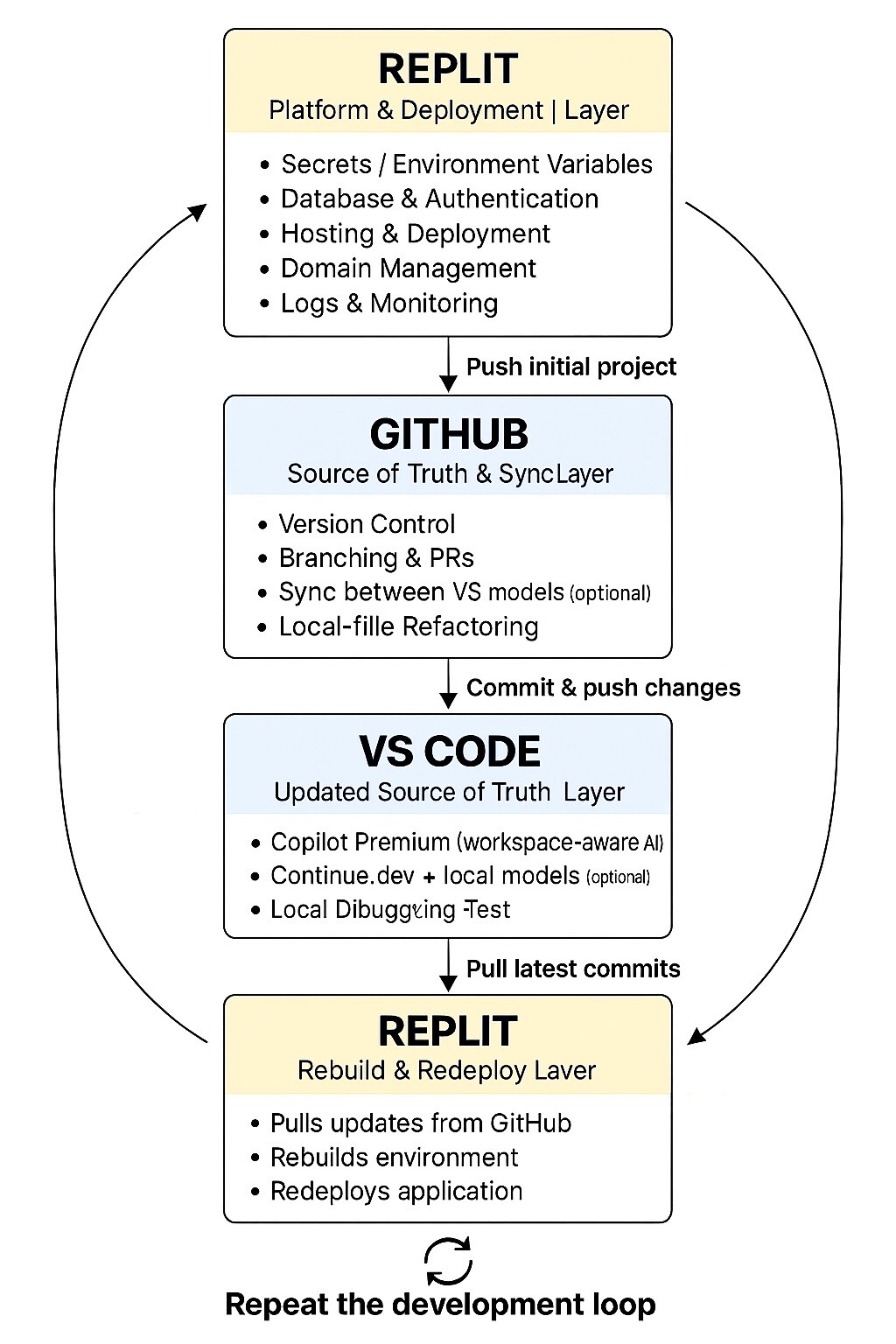
The Workflow (High Level)
- Push your project to GitHub.
- Clone the repo in VS Code and open your codebase locally.
- Enable Copilot or Codex inside VS Code.
- Ask the AI to generate an instruction set so it can understand your codebase.
- Use the AI to make unlimited changes without paying Replit’s per action costs.
- Commit and push your changes back to GitHub.
- Pull the new commits into Replit.
- If you made a lot of changes, spend a dollar or two to let Replit’s agent sync and validate everything.
- Repeat the cycle.
Why This Works
This method is perfect for:
- Cosmetic fixes
- Mundane cleanup
- Repetitive refactors
- Small, isolated improvements
All the stuff that should not cost 20 to 50 dollars in agent actions.
I reserve my Replit credits for:
- Architecture wide changes
- Deep refactors
- Logic rewrites
- Anything that touches multiple subsystems
VS Code and Copilot struggle with those, and resetting the environment in Replit can be painful if you are not familiar with it.
So I group the small stuff, plan it out, write a few good prompts, and let VS Code handle it for free. Then I push everything back to Replit.
The Cost Savings
Using this workflow, I can comfortably keep my Replit spending around:
- 65 to 100 dollars per month total
(subscription plus occasional agent use)
Instead of:
- 200 to 500 dollars or more
depending on the project and error rate.
For hobbyists, that is still steep.
For people building real products, it is a no brainer.
If you are already paying for GPT or Copilot, this workflow is basically free.
About the Workflow Images
Yes, I used GPT to generate the workflow diagrams.
Yes, it was a little tacky.
Yes, I did it because I wanted to get this out quickly and help someone.
I wrote the macro workflow manually, then had my AI Sloppy Joe turn it into the images you saw. I liked them, so I used them. Do not sue me.
———————————————————————————————————————————
Original Post Content
Hey,
Psst!
Here is a freebie.
I was going to package this into a more reproducible workflow and (try) sell it to Replit users / Vibe-Coders then I woke up, and realized I’m not a total Arse. It’s so obvious and known in the industry that it shouldn’t be monetized lol Rather provided free…
Here it is(unless you already knew)
You can save major $$$$$ on Replit Agent Costs just by following a simple workflow and using the IDE VS Code and Github or GitHub Pro (like $10 month). You can also use a variety of the paid LLM’s you maybe already pay for like your monthly Copilot or ChatGPT subscription to be your own agent.
Using Github for the pipeline…
1.) push your project to your Github repo.
2.) Open VS Code & clone the repo and pull your codebase up on VS Code
3.) Add Codex, or at the bottom of the VS code menu load your copilot login for GitHub
4.) ask the AI on VS code to create the instruction set for it to go through the codebase and understand it
5.) use the AI to make unlimited changes to your codebase without the heavy replit price tag
6.) push the commits to GitHub
7.) On replit pull the newly created commits to your replit project
8.) if a lot of commits you may want to spend a buck on having replits agent run through the changes and just sync it up to date.
9.) continue the cycle.
Note:
I’ve noticed this method is great for tackling the mundane, and cosmetic issues at a fraction or no cost at all compared to using the replit agent to do them.
I typically will use my credits and larger purchase of Replit agent use for things that are wired throughout the whole codebase, extensive architecture / design changes, and changes that require logical changes throughout the whole application as the VS Code and Copiolt LLM setup struggles with it, as setting it back up in Replit can be a pain if you don’t know what you are doing.
Then I create and log all of the minor or cosmetic issues (you know the ones), and instead of making the agent do any of those I use a day to make a well thought out plan, and make a few prompts for the VS Code agent and in VS code I’ll make the changes and push back to replit as described.
Doing it this way, can reduce your developer costs tremendously. In fact, as a teams owner and user membership owner I can now safely get away with spending a max of $100 / a month for replit agent costs/ subscription costs (if that… more like it could be $65 base subscription price) and then I’m still able to get all the work done I wanted that would’ve easily run 200-500+ depending on what you’re doing/ errors… While, yes, still steep for those not developing for career, profit, or pure passion. For those who are willing to or are already paying more than $200/ month for dev. costs give it a shot (if not already).
Just by using this workflow, and the AI subscription like GPT or Copilot (I personally already was paying for both)
I was going to, and perhaps might bundle it into something reusable… I’m just swamped…
EDIT:
MACRO Workflow:
EDIT:
SUB Workflow (1/4):

EDIT:
SUB Workflow (2/4):

EDIT:
SUB Workflow (3/4):

EDIT:
SUB Workflow (4/4):

EDIT:
AI Disclosure:
I did in fact use GPT for the images produced for the workflows.
This was tacky. I admit it. I just wanted to get them out there ASAP for free, hoping it speeds / helps even one person.
I did manually create the macro workflow using natural language. Then I got my AI “Sloppy Joe”, to turn the main work flow, and the sub-work flows (Macro - Micro), into the images you see, and because I liked them and thought it made the images well, I decided to use them. Sue me. No Don’t.