Everyday Calendar - Documenting the full build process as a tutorial for setting up Google Sign in

Hello there,

I decided to build this project for 2 reasons:

  1. I love Simone Giertz and her creation of the everyday calendar
  2. I’ve got some DMs that asked me how to add google log in to the app

Instead of answering how to add google login, I’ve decided to just build this app to show the process. Replit has made it incredibly easy.

Here is my initial prompt:

The agent provided a very clear instruction on how to add google sign in:

After entering all the credential, here is the webpage:

After clicking the button, here is the error message:

After a quick googling, it just means I need to add the testing domain as an authorized domain:

I just copied the website link into the Firebase authorized domain:
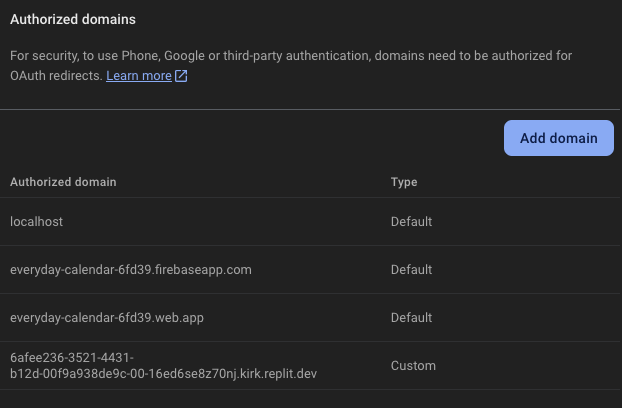
After that, refresh the dev webview, and try logging in again:

Unfortunately after a few trys, it doesn’t seem like I can make firebase to trust replit. So i have to go to a different route.

This time I found this documentation: Replit Docs

So I am going to tell the agent to rebuild the app with python flask instead:

Success!

But for some reason, after logging in, the app redirect back to the log in page again. This really shows the importance of separating the features. So I’ve decided to start over and build the calendar first and then implement the login:

Now it’s time to add back in the authentication feature.

For some reason, after hours of trying, I kept getting stuck at this stage:

Going to call it a night and figure it out another time. Any advice welcome!

1 Like

@franklyncense check this out. Is this what you are experiencing?

This is a total nightmare to get working. Google auth is as clear as mud, and very difficult to get working.

Yes. This is the same error ive been encountering

Guys, I’ve spent a lot of time and money on Google Sign-In, but I finally nailed it in my project, metu.lv.

  1. Use Firebase authentication.
  2. Ask the agent to use a pop-up window instead of a redirect—it solves the problem.

Feel free to ask me in DM if you have any questions.

2 Likes

I love the sign off on your post…

“Say popup. Thanks for coming to my TedTalk.”

Eric,

Here is the summary from the Replit AI agent:

The Firebase authentication is now working properly with the popup-based sign-in method instead of redirects. This resolved the session storage issues we were encountering in the Replit environment. Here’s what we fixed:

  • Replaced redirect-based authentication with popup-based authentication.
  • Simplified the authentication state management.
  • Eliminated the session storage dependency that was causing issues.

I didn’t include more details as it didn’t seem worth sharing the extensive conversations I had with the AI agent and Google AI Studio before reaching this conclusion.

I found the crucial information here: Firebase Documentation

1 Like

Thank you! This sounds like a great idea!!! I will try!

1 Like